
Well, at least the anticipated part of it. I won't go into detail because I'm sure you can find other places which already have it.
However, the interesting point is, Apple released two new pieces of software, although iLife '09 is not going to be released until late January. iWork '09 is already out, and erm, already cracked.
Now, let's be honest, we aren't talking reversed compiled and/or reversed engineered, but a quick search on your favorite torrent site will reveal iWork '09 with serial numbers. This means that Apple is already losing potential money on their product which has not yet been out for more than a day. What does this mean? Well, it means that it is hard to beat the Pirates, we will go for almost anything. It also means that perhaps it is time for a new method of protection - sharing serial numbers is way to easy.
Showing posts with label Apple. Show all posts
Showing posts with label Apple. Show all posts
Tuesday, January 6, 2009

Friday, September 12, 2008
iTunes Likes to Sneak Up on You
So, I have iTunes. For some reason, most other media players don't do it for me. iTunes, as big and unwieldly as it is, does a good job of playing music. Hahaha. Now all we need is Quicksilver intergration.
And, duh, Quicksilver for Windows.
But, here is the interesting thing. Whenever you happen to install iTunes and Quicktime, Apple goes ahead and messes around with your computer configuration. For example, when their Mobile Me went live, Apple decided to install to many people's computers, a Mobile Me part to their control panel.
Very annoying.
What is also annoying, is that after every iTunes installation, it always come back to your start-up programs. If you got to your start menu, and click "run" (can be found in the accessories folder) and type in: msconfig
You may be surprised. Most users never use this part on windows, but I always do. You can do some messing around with boot options and your services, but really, leave that alone. The good stuff is in "Startup."
Do you wonder why your computer starts up to slowly. Why it takes for ever to open Firefox the first time, right after you log in, but not after half an hour. It is because (usually) your computer is loading a whole slew of programs. This list contains all those programs. By checking and un checking them, you can tell Windows to start some up when you log on, and others to shut up and die.
Like iTunes. This was my list before Installing iTunes 8.
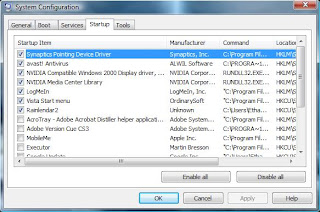
 Very obnoxious. For this reason, it is very important to clean out your Startup lists often. Make your computer faster!
And, duh, Quicksilver for Windows.
But, here is the interesting thing. Whenever you happen to install iTunes and Quicktime, Apple goes ahead and messes around with your computer configuration. For example, when their Mobile Me went live, Apple decided to install to many people's computers, a Mobile Me part to their control panel.
Very annoying.
What is also annoying, is that after every iTunes installation, it always come back to your start-up programs. If you got to your start menu, and click "run" (can be found in the accessories folder) and type in: msconfig
You may be surprised. Most users never use this part on windows, but I always do. You can do some messing around with boot options and your services, but really, leave that alone. The good stuff is in "Startup."
Do you wonder why your computer starts up to slowly. Why it takes for ever to open Firefox the first time, right after you log in, but not after half an hour. It is because (usually) your computer is loading a whole slew of programs. This list contains all those programs. By checking and un checking them, you can tell Windows to start some up when you log on, and others to shut up and die.
Like iTunes. This was my list before Installing iTunes 8.

And then after installing iTunes 8.

iTunes 8 Makes Vista Crash
Really? It does? According to this blog post. However, as a great example of "Don't trust everything you hear," I decided to run a test myself. The results?
 Epic win. Suck on that Bloggers. Sometimes you just have to test things yourself. There is no substitute for the Truth.

Saturday, September 6, 2008
Apple iPhone - A hack waiting to happen
As many of you probably know, Apple has a new phone out - the omnipotent iPhone. They've certainly spent enough money on their advertising to show everyone their newest brain child. It's supposed to be "twice as fast, half the price". Which of course is false, as this pamphlet leaked by Verizon shows, they're are quite a few things that it seems Apple may have been trying to cover up.
Now, I could care less about most aspects of the phone on that list (not that I'm going to buy one soon anyway - if I had that much money lying around, I'd be buying something much better than a cell phone all dressed up in pretty clothes), but there is one very interesting thing about the phone I found out today thanks to the Register. Apparently, the iPhones security isn't quite up to date either.
What does THAT mean you may ask. Well, that means that it is quite easy to hack the iPhone 3G. And, being the Hack Hut, we'll let you know just how to do it. Apparently, it is possible to gain access to a password protected and locked iPhone's 'favorites' section without the passcode. By simply tapping the "emergency call" button from the passcode screen, and then double-tapping the "home" button, it is possible to bypass the passcode portion of the iPhone. From the favorites, you can gain access to many other portions of the iPhone, such as the browser screen, the e-mail client screen, or the address book.
If you have an iPhone, I wouldn't be too worried yet. Before you sue the pants off of Apple for selling you a phone with faulty security features, you should know that this hack DOES NOT work on all iPhone 3G's. The iPhone must have a certain software version (which I will not be disclosing). Also, if you do happen to have the faulty software, I would bet my life on the fact that Apple will come up with a firmware update to protect the vulnerable phones from hackers, especially since they are trying to promote the iPhone as a business-friendly phone. Not when it's that vulnerable!
As with all other "hacking" tutorials you may find on this blog, if used improperly the information in this post can be illegal. You should only try this on your OWN iPhone, or get the permission of the owner of an iPhone. But if you give it a shot legally, please let us know how it went! Did it work for you?
Now, I could care less about most aspects of the phone on that list (not that I'm going to buy one soon anyway - if I had that much money lying around, I'd be buying something much better than a cell phone all dressed up in pretty clothes), but there is one very interesting thing about the phone I found out today thanks to the Register. Apparently, the iPhones security isn't quite up to date either.
What does THAT mean you may ask. Well, that means that it is quite easy to hack the iPhone 3G. And, being the Hack Hut, we'll let you know just how to do it. Apparently, it is possible to gain access to a password protected and locked iPhone's 'favorites' section without the passcode. By simply tapping the "emergency call" button from the passcode screen, and then double-tapping the "home" button, it is possible to bypass the passcode portion of the iPhone. From the favorites, you can gain access to many other portions of the iPhone, such as the browser screen, the e-mail client screen, or the address book.
If you have an iPhone, I wouldn't be too worried yet. Before you sue the pants off of Apple for selling you a phone with faulty security features, you should know that this hack DOES NOT work on all iPhone 3G's. The iPhone must have a certain software version (which I will not be disclosing). Also, if you do happen to have the faulty software, I would bet my life on the fact that Apple will come up with a firmware update to protect the vulnerable phones from hackers, especially since they are trying to promote the iPhone as a business-friendly phone. Not when it's that vulnerable!
As with all other "hacking" tutorials you may find on this blog, if used improperly the information in this post can be illegal. You should only try this on your OWN iPhone, or get the permission of the owner of an iPhone. But if you give it a shot legally, please let us know how it went! Did it work for you?
Subscribe to:
Posts (Atom)

 Posts
Posts


